Posts

Showing posts with the label github

A GitHub Code Archeology adventure
Image
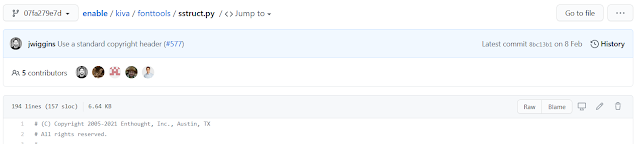
At work, I am part of a team which maintains the Enthought Tool Suite (ETS). ETS includes a number of open source Python packages which are the foundation of the desktop applications we build at work. One of those packages is enable , a 2D drawing library. Yesterday, I came across this issue on enable regarding a python module ( kiva.fonttools.sstruct ) which wasn't used anywhere in the enable codebase at the moment. "... at the moment" is important here because the enable GitHub repository has been evolving for over 10 years now and we don't know if at some point in the past, kiva.fonttools.sstruct was used somewhere in enable. Before we decide on removing the python module from the codebase, we need to understand when it was added, who was using it and how and when the dependency on enable.fonttools.struct got removed from enable. Only then can we confidently remove the module without worrying about unexpected repurcussions. So, I started digging. The first thing ...

Recommend GitHub Guides to newhires.

I've been using GitHub everyday for the last 4 years. I think I spend 2+ hours everyday on the website. Some of it is spent opening issues. Some more spent opening Pull Requests. Some time spent commenting on open issues and pull requests. That probably covers 90% of the time I spend on GitHub. This is what most software developers can expect if they join a company which uses GitHub for code/software. On that note, becoming comfortable with the website, it's user interface and being able to take full advantage of it is very important to be productive at work. GitHub guides look pretty useful in that context, especially for new developers who have little to no experience with GitHub. I had been using GitHub before I joined Enthought but I was using it purely as a place to back up my code. commit -> push -> rinse and repeat. Specifically, The "Hello world" https://guides.github.com/activities/hello-world/ guide is something that *every single developer* s...

GitHub papercut - Forgotten branches

As you can see below, once you login to GitHub, you will be able to see the Pull Requests and Issues that are relevant to you. Issues that are assigned to you, PRs that you opened, PRs that your review was requested for etc. But one thing is missing. Branches. Branches are what lead to Pull Requests in the first place and there are a few times when I choose to push a branch but not open a PR against it. It might be because I am not done working on it. It might be because I am not sure if it will be reviewed quickly at the moment. It would be nice if GitHub allowed me to see all branches I pushed to GitHub and their statuses, especially the branches that aren't under review as PRs. Keep this in mind if you are not sold on the value of this request. When the company you work for uses GitHub, you might touch ~5-10 repositories over the course of an year. Not all work can be reviewed and merged immediately. Not all work is ready for review in the first place. You could def...

A GitHub paper cut got fixed!

Image
A while back, I wrote about a GitHub papercut - the annoying fact that the `Changes` tab in a GitHub PR will by default list/show all the changes in all of the files in the PR. There are times when a large number of files are changes. There can be times when a large number of files are modified automatically, which don't need to be reviewed manually. Up until recently, the only way to see the changes in files you cared about was to manually hide changes in the files one after another. See my earlier blogpost for more info - https://rahulporuri.blogspot.com/2018/11/github-papercut-collapsing-files-in.html . Up until recently. Because I recently saw this when reviewing changes in a PR -

Making websites using Bootstrap

Image
Because I had nothing better to do on a Friday evening, I (finally) took a look at the Bootstrap framework . For those of you who don't know, Bootstrap is (sort of) a library that provides building blocks that can be used to build responsive websites (as I understand it). About an year ago, a friend of mine used it to setup his personal website while applying for grad school. I, on the other hand, was lazy, among other things. So my interest in understanding and using bootstrap got put in the attic as I waited for the right time™to do so. Well, yesterday seemed to be as good a day as any so I ploughed through the example/templates  provided by the wonderful people at Bootstrap. And all I did was edit and modify the templates as I needed/wanted them to be and voila, in under 6 hours, I had 4 websites. The first is based on the Jumbotron-Narrow template  and my version of it can be found here . All of the code is available on my Github repository  and this is how it lo...

sync fork with remote git

Software developers or open source software (OSS) contributors that use GitHub to manage their projects probably use one of two git workflows : fork master branch, i.e main repository, to create a personal copy of the project --> clone fork to local workstation --> create a new local branch from fork --> make relevant changes on local branch --> commit changes to local branch --> push local branch to origin, i.e your forked copy on GitHub  --> submit a pull request (PR), clone master branch, i.e main repository to create a personal copy of the project --> create a new local branch from master --> make relevant changes on local branch --> commit changes to local branch --> push branch to origin --> submit a PR. Which of these two workflows the developers follow depends on many things. And now that I've introduced you to the basic workflow and the premise as to why/how I ran into a problem, I can tell you about the problem and the soluti...

Using git to work on a project across OS and machines

If you're working for a company/team that develops a product that can be used on Windows, OS X and Linux, then you will have to test the changes you make on all three platforms to see if things are working the way you intend them to. I presume that you're using version control, I personally use git, to manage the code base for the project. Say you make changes to the code base on an OSX machine and everything looks fine so you push the changes to a branch. Now, you will want to look at the changes on a different OS to make sure that the changes are behaving well, which you can do using 1 git checkout --track <remote>/<branch-name> I hope you're familiar with   git checkout,  which can be used to change to a different working branch or it can be used to remove changes made on a file on the current branch. The additional --track argument tells git to create a new branch from a remote branch, where the remote is usually set as origin. You're prob...

Pocket reading list : Week 1.2 of May

The CIA Waterboarded the Wrong Man 83 Times in 1 Month  : In the name of the war on terror, the American government seems to have carried out operations that violate human rights and numerous international laws. This is one such account of a man tortured, maybe even for the sake of learning how effective the methods of torture were, and not coincidentally, the man was trained by the CIA to fight against the Russians, the very agency that tortured him a decade later. Being A Developer After 40  : Now that I'm on the path to becoming a software developer, I'm taking such articles seriously. This is an account of a software developer who has over 15 years of experience in the industry and who has seen one fad after another pass. A question that every software developer has to address at some point or the other is whether or not they are programming in the right language, whether or not they are moving forward, with respect to the community and what not. And this guy has prett...

More git awesomeness

As I mentioned in my previous post, working at Enthought involves a lot of forking, commiting, pushing and merging. Git is used for code version control and while I was comfortable working with git earlier, I had to learn a lot of new tricks. One of the first things I had to learn was branching and PRs, as I had mentioned in the previous post. A note of caution here. Say you're working on adding features to a stable code. In order to add the features and check them, you create a branch called 'features' using git checkout -b features Now say, in the middle of this process, you've been asked to fix couple of bugs in the supposedly stable code. To code and submit the fixes, you need to work in a different branch, say 'fix', created using git checkout -b fix Here's the catch. You need to create the branch from master/stable and not the features branch you were previous on. So you will have to run the second command after running git checkout mas...